Voting Settings
Public Voting
Enable Public Voting to allow anyone to participate in a poll without login.
Public voting is handled through Poll voting events. A poll lets people vote from a public cast-votes link without creating Pepvote accounts or receiving voter keys.
For private or known-voter voting, create an Election instead.
What is Public Voting?
In a poll, voters open the public voting link and cast votes directly. Pepvote can still enforce the voting event start/end time, ballot rules, voter limit, and optional Voter ID requirements.
How to set up public voting
- Create a new voting event with Type set to
Poll. - Add positions and candidates.
- Approve the candidates that should appear on the ballot.
- Open Voting Event Settings.
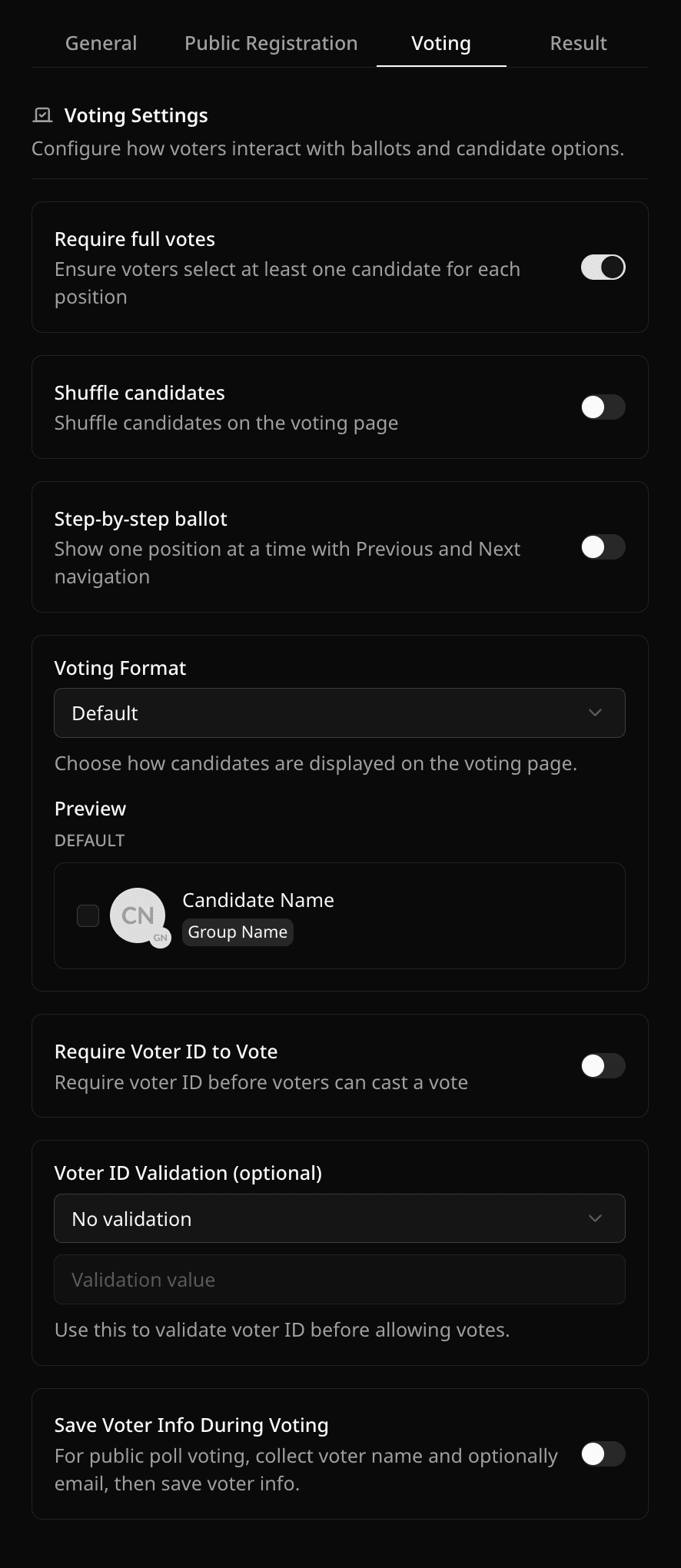
- In the Voting tab, configure optional poll rules such as Require Voter ID to Vote and Save Voter Info During Voting.
- Use Share Links to copy the public cast-votes link.
What changes for polls
- Voter accounts are not required before voting.
- The Voters tab is not the main setup path for public participation.
- The public cast-votes link is available from Share Links.
- Candidate registration can still be enabled if you want nominees to self-register before voting starts.
- Voter registration links are hidden for polls.
Optional voter info collection
If Save Voter Info During Voting is enabled, Pepvote asks poll voters for their name and optional email before the ballot. This can help with auditing and follow-up, but it is separate from election-style voter registration.
Was this helpful?
Last updated August 27, 2026